
You can adjust default settings for comments, chat, downloads, scoreboard display, and pricing directly from your channel's Settings area in the admin dashboard. Follow the steps below to update these options.
Navigate to your channel admin dashboard/backend
Then press Settings in the top red menu and then Channel
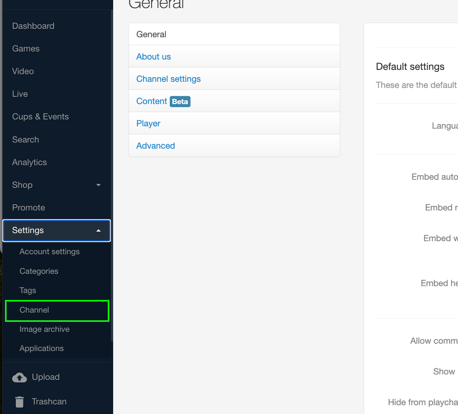
Scroll down to see various default options.

Comments: Allow viewers to comment on your livestream (yes/no).
Chat: Enable the chat box on your livestream (yes/no)
Download: Allow viewers to download content from your channel (yes/no)
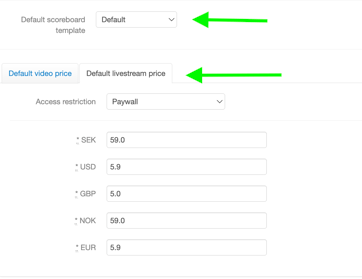
Scoreboard: Set the default scoreboard display for your games. Options include: teams only; teams with scores; teams with score, time, and period.
Price: Set the default price for livestreams on your channel (minimum prices vary by currency — check your admin dashboard or contact support for current rates).
(minimum 29 SEK/ 3 USD/ 3 GBP/
29 NOK/ 3 EUR/299 RSD)
Once you have configured your desired settings, scroll to the bottom of the page and click Save to apply your changes.